From Zero to Self-Hosted Building My First Homelab Architecture
A step-by-step journey from a single Raspberry Pi to a multi-node homelab running Proxmox, Docker, and dozens of self-hosted services, including Nextcloud, Home Assistant, and more.
If you had told me a year ago that I would be managing a multi-node home server infrastructure, I wouldn’t have believed you. When I started out, I began at absolute zero. I didn’t know what a hypervisor was, Docker was just a tech buzzword, and my understanding of DNS was completely non-existent.
My entry point into this world was simple: a single Raspberry Pi dedicated to running Home Assistant. It was a fantastic way to dip my toes in, but as I expanded my smart home and added more integrations, the Pi hit its hardware limits. I installed way too many add-ons, bogged down the system resources, and eventually, it crashed.
Around the same time, I hit a completely different digital wall: my Google Photos storage limit. I refused to pay a recurring monthly fee just to store my own files and memories. The idea of truly owning my data by de-Googling my life became the ultimate goal. What started as a practical workaround for cloud storage limits quickly evolved into a genuine passion for self-hosting, networking, and systems administration.
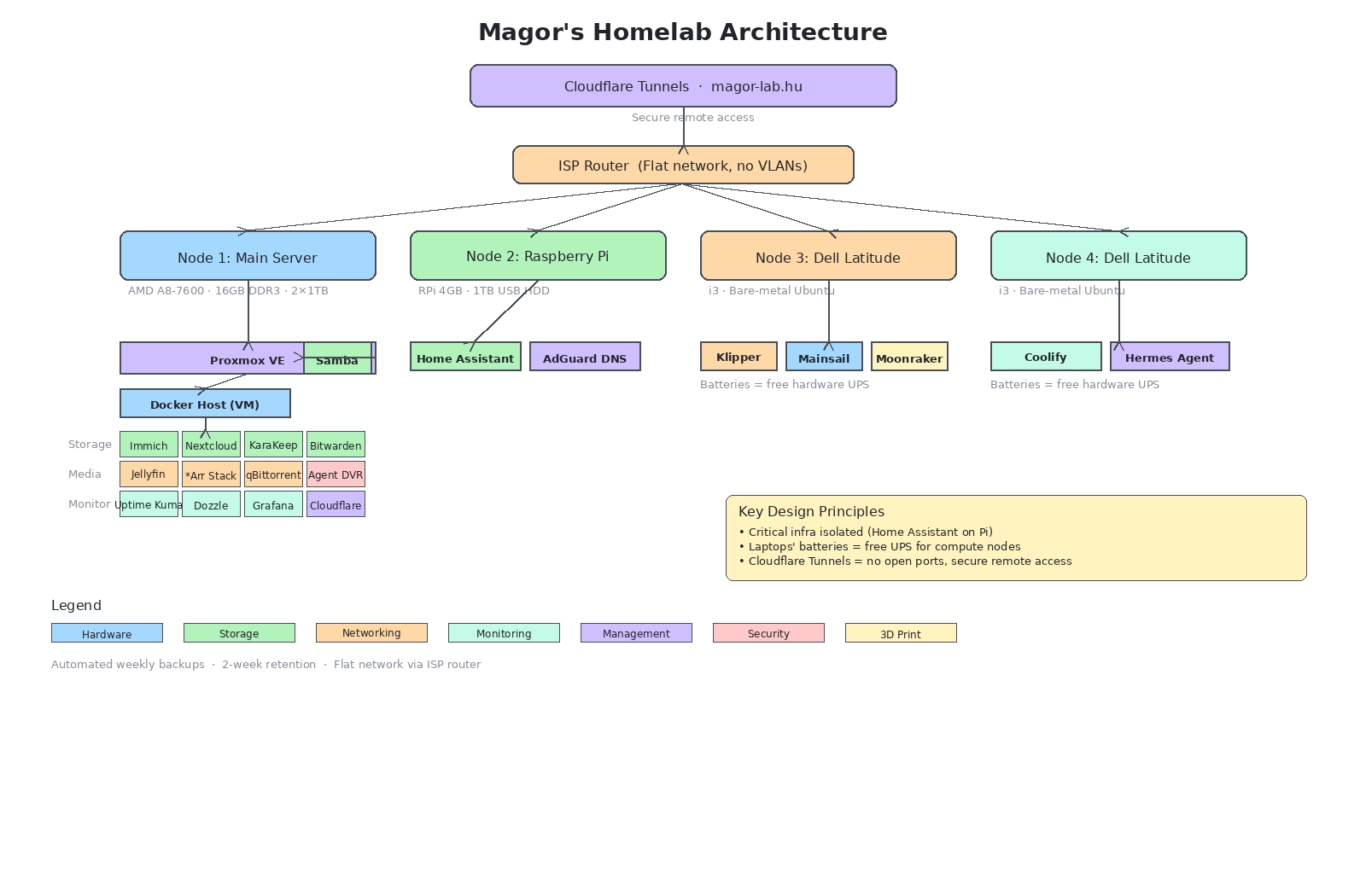 Interactive version: Open in Excalidraw
The hardware: budget-friendly and repurposed
You do not need to spend thousands of dollars on enterprise rack-mounted gear to get started. This entire setup is built from budget-friendly, repurposed hardware that has been upgraded over time.
Node 1 (The Main Server): A repurposed school PC featuring an AMD A8-7600 processor with 4 cores. Because the barebones PC itself was free, the budget went entirely into upgrades. It was opened up, maxed out with 16GB of DDR3 RAM, and configured with two 1TB hard drives for direct storage.
Node 2 (The Smart Hub & DNS): The original Raspberry Pi, equipped with 4GB of RAM. Instead of forcing it to do everything, its role is now highly focused. It runs Home Assistant OS off a 1TB USB hard drive and actively handles network-wide ad blocking.
Nodes 3 & 4 (The Compute Fleet): Two repurposed Dell Latitude 5420 laptops equipped with Intel Core i3 processors. Node 3 runs bare-metal Ubuntu to manage a 3D printing environment using Klipper, Moonraker, and Mainsail. Node 4 runs Coolify to deploy personal projects alongside a Hermes agent. The absolute best part of using old laptops? The built-in laptop batteries act as a free, automatic hardware UPS, keeping the compute nodes online even if the power blinks.
The software: hypervisors and containers
Going from a standard desktop user to managing server operating systems was a steep learning curve. Learning how to properly isolate applications completely changed the reliability of the lab.
The Hypervisor (Proxmox VE): Running Proxmox VE directly on the bare metal of the main PC was the first major breakthrough. It taught me how to cleanly divide system resources. It hosts an Ubuntu Server VM dedicated purely to Samba for network file sharing (1 vCPU, 1GB RAM) and a main Docker host VM given the bulk of the power (3 vCPUs, 13.6GB RAM).
Containerization (Docker Compose): Learning Docker Compose changed everything. Instead of installing applications directly onto the host machine and tangling up dependencies, services are deployed and isolated cleanly using simple, text-based configuration files.
Every service in the lab
Every application running in this environment represents a specific problem I ran into and a steep learning curve I had to figure out.
Data ownership and storage
Immich: This is the solution to running out of cloud storage. Setting it up taught me a lot about local database performance. It matches the speed, facial recognition, and mobile backup experience of commercial alternatives without data caps or privacy compromises.
Nextcloud: A complete Google Drive and productivity suite replacement. Deploying it teaches you how to manage web server environments, optimize cloud synchronization, and handle large-scale file storage safely.
KaraKeep (Formerly Hoarder): My self-hosted solution for link and bookmark storage. Moving this away from proprietary platforms means all my saved research, technical documentation, and links are kept in a centralized, private repository that I completely control.
Bitwarden: Moving credentials off third-party cloud vaults into a locally hosted instance is a major security milestone. It shifts the complete responsibility of credential security to local hardware, emphasizing the need for secure container deployments.
Samba: Running this inside a dedicated, lightweight VM inside Proxmox keeps data storage separate from the application layer. It provides a clean, zero-fuss way to handle cross-platform file transfers over the local network.
Automation and deployment
Home Assistant OS: The original gateway drug to the entire lab. After its initial overload crash, I learned to keep it strictly on the Raspberry Pi. Critical home automation infrastructure stays independent so it remains stable regardless of experiments on the main server.
Coolify & Hermes Agent: This stack turned a standard laptop into a private PaaS (Platform-as-a-Service) environment. It bridges the gap between raw server administration and modern developer workflows, making it easy to deploy personal code projects via automated builds.
Klipper, Moonraker, & Mainsail: Running this stack on bare-metal Ubuntu lets the homelab interface directly with physical hardware. The laptop’s built-in battery acts as a hardware UPS, preventing ruined 3D prints during minor power fluctuations.
Media automation and entertainment
Jellyfin: Proved that efficient media streaming is fully achievable on older hardware without massive enterprise overhead. The older AMD A8 CPU means I had to understand media codecs and client-side direct playing to avoid resource-heavy server transcoding.
The *Arr Stack & qBittorrent: The best practical lesson in container interoperability and shared storage volumes I’ve had. Configuring these services to communicate via APIs and automatically handle file post-processing is a big milestone for mastering Docker directory structures.
Networking, monitoring, and security
AdGuard DNS: What got me into intermediate networking. Running this as an add-on on the Pi taught me how DNS routing works, giving the entire household network-wide privacy controls and local domain routing without needing an expensive, enterprise-grade managed router.
Cloudflare Tunnels: This changed how I handle remote access. It allows secure incoming traffic to the
magor-lab.hudomain without exposing open ports to the public internet.Agent DVR: Handles high-throughput security camera streams locally. Managing continuous video processing pipelines without overloading the main server VM’s CPU allocations was a good exercise in resource planning.
Uptime Kuma: Taught me the value of proactive infrastructure monitoring. Instead of manually checking if a site or service is up, it introduces automated health checks and immediate visibility into network stability.
Dozzle: A quality-of-life utility for a containerized lab. It removes the friction of debugging by streaming live Docker container logs directly to a clean web interface, saving constant SSH terminal commands when an app misbehaves.
Grafana: Where all the metrics come together. I learned how to collect, aggregate, and parse system data, turning raw hardware numbers into something I can actually scan and act on.
Operational lessons learned
Operating on a flat network utilizing a standard ISP router without VLAN support forced a focus on maximizing basic software tools rather than throwing money at expensive networking gear.
The most critical lesson was establishing a resilient backup strategy. Moving past the dangerous “manual Proxmox backups whenever I remember” phase was essential. The entire ecosystem is now secured with automated weekly backups and a strict two-week retention policy, so when something inevitably breaks during an upgrade, it takes minutes to restore rather than days.
Building this homelab was a big step from where it started. Going from knowing absolutely nothing about server administration to running a private cloud infrastructure proved something I didn’t expect: you don’t need a professional background in IT to take control of your own data. You just need a starting point and the willingness to figure things out as you go.